Asana Review: Calm, Structured Project Management That Just Works
StackReview is reader-supported. When you buy through links on our site, we may earn an affiliate commission. This never influences our scores.
Summary
4.0A polished, well-organized project manager that favors clarity over feature-stuffing — priced at a premium.
Best for: Teams that want clean, structured task and project tracking without clutter
- Ease of use
- 4.4
- Features
- 4.1
- Value for money
- 3.7
- Support
- 4.1
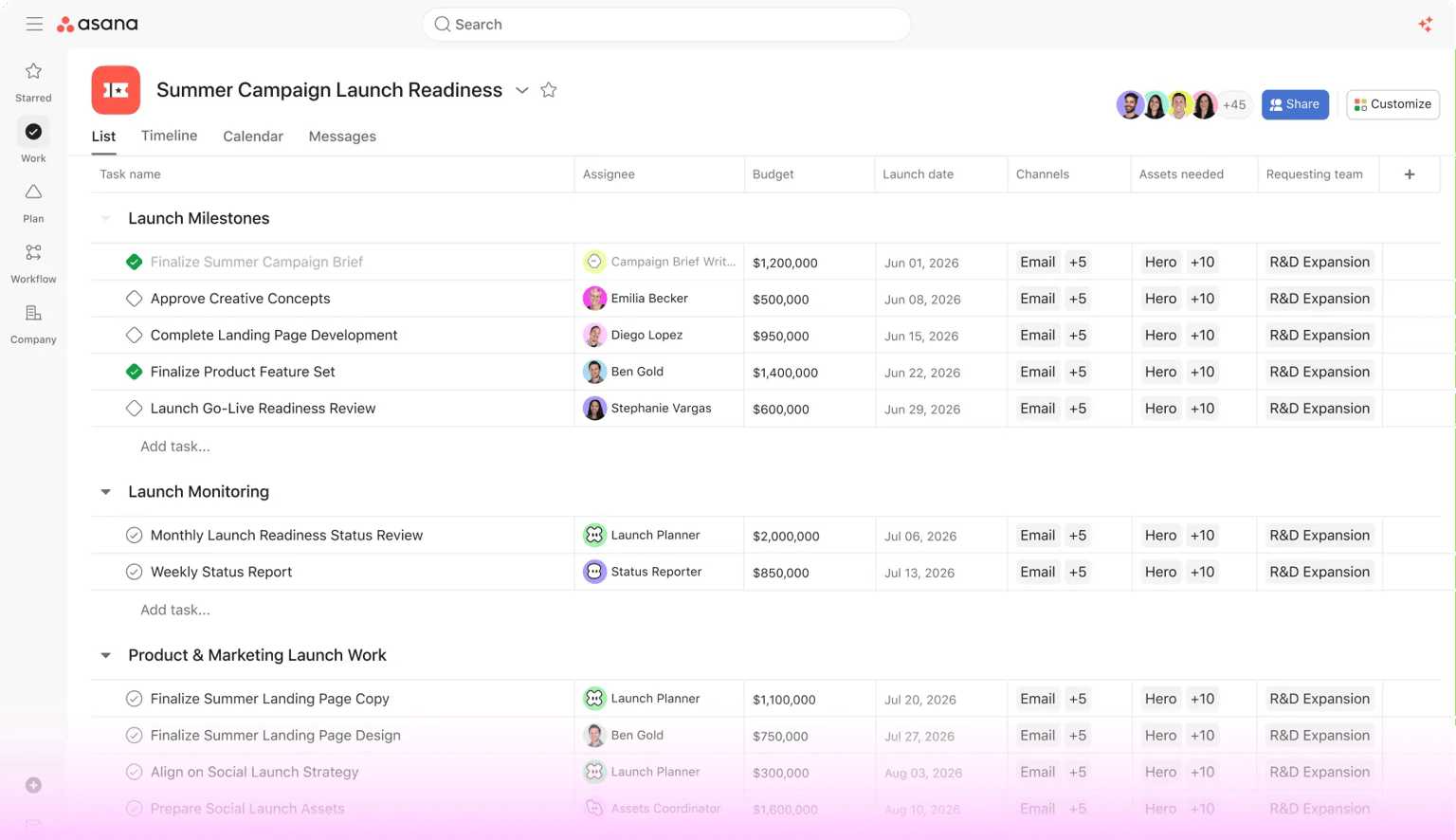
TL;DR: Asana is calm, structured project management that favors clarity over feature-stuffing. It's reliable, easy to adopt, and scales without becoming a mess — you just pay a premium for the polish, and it's deliberately narrower than the all-in-one crowd.
What is Asana?
Asana focuses on doing tasks, projects, and timelines cleanly, rather than cramming in docs and whiteboards. The result feels calm and legible even as projects grow — a deliberate philosophy of restraint.
That focus is why Asana is often the tool teams keep when flashier all-in-one rivals get abandoned: it's easy to understand and hard to make messy.
Standout features
- Thoughtful task model. Tasks, subtasks, sections, and dependencies, done well.
- Multiple views. List, board, timeline, and calendar over the same work.
- Rules and automation. Automate the repetitive parts of a workflow.
- Portfolios and goals. A tidy leadership roll-up on higher tiers.
Pricing at a glance
| Plan | Approx. price (per user / mo) | Best for |
|---|---|---|
| Personal (Free) | $0 | Individuals and small teams |
| Starter | ~$11–13 | Teams needing timeline + automation |
| Advanced | ~$25–30 | Teams needing goals, portfolios, reporting |
| Enterprise | Custom | Security, admin, and scale |
Prices are approximate and billed annually — verify on the official pricing page.
Who it's for
Marketing, ops, and product teams that want dependable, well-structured project tracking that stays clean as it scales.
Who should skip it
Teams who want an everything-app with built-in docs and whiteboards, or those who need the most features per dollar — Asana is intentionally more focused.
How it compares
Monday.com is more visual and colorful. ClickUp offers far more features (and more complexity). Trello is the simpler, board-first option.
Final verdict
Asana wins on clarity. Teams love it precisely because it doesn't try to do everything. Budget for the tier you actually need, and it's one of the most dependable trackers you can adopt.
FAQ
Is Asana free for small teams? Yes — the free Personal plan covers individuals and small teams; paid tiers add timeline, automation, and reporting.
Does Asana have docs and whiteboards? Not to the depth of all-in-one tools — Asana deliberately focuses on tasks, projects, and workflows.
Is Asana better than Monday.com? Asana is calmer and more structured; Monday is more visual and easier to roll out. It comes down to team taste.
Pros
- Clean, calm, well-organized interface
- Strong task, project, and timeline structure
- Good workflow rules and automation
- Reliable and fast
- Solid reporting and portfolios on higher tiers
Cons
- Premium pricing for full features
- Fewer 'all-in-one' extras than some rivals
- No native docs/whiteboard depth
- Advanced reporting gated to higher tiers
Pricing
Free tier for small teams; paid Starter and Advanced tiers per user/month, plus Enterprise. Indicative as of the review date — verify with Asana.
Verdict
4.0 / 5A polished, well-organized project manager that favors clarity over feature-stuffing — priced at a premium.
Visit AsanaAlternatives to consider
Get the next review first
One honest SaaS review in your inbox each week. No spam, unsubscribe anytime.
About the author
Sunny Dubey
Founder & Editor of StackReview. Sunny runs a digital marketing company in India and has spent years buying, deploying, and abandoning SaaS tools for his own team — every review here is tested, written, and scored by him after weeks of real use.
More from Sunny Dubey →